

|
Materials |
|
Material Properties |
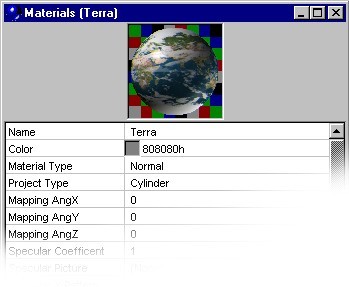 |
Materials are used entities in order to equip the Objects of a not simulabile superficial detail through simple subdivision of the same ones in smaller polygons. A Material is possible to associate it more Object but the contrary is not worked.
Below the Properties with the relative descriptions are listed:
| Property | Description |
| Name | Material Name. Must be distinct for all the Scene and does not have to contain spaces. |
| Color | Color |
| Material Type | Material Types |
| Project Type | Define in that way the Maps come wrapped around the Object |
| Mapping AngX | Material Rotate regarding the asseX (in Degrees) |
| Mapping AngX | Material Rotate regarding the asseY (in Degrees) |
| Mapping AngX | Material Rotate regarding the asseZ (in Degrees) |
| Specular Coefficient | SpotLight Intensity |
| Specular Picture | Map to use in place of "Specular Coefficient" |
| Specular X Pattern | How many times the Specular Map is repeated in the direction X |
| Specular Y Pattern | How many times the Specular Map is repeated in the direction Y |
| Invert Specular Map | Inverts the Specular Map Values |
| Specular Map Value | Specular Map Intensity |
| Specular Exponent | SpotLight Size |
| Reflect | Enable the Glares (in RayTracing) |
| Reflect Color | Glare Amount |
| Texture Type | Possibility to choose between a Texture of BitMap type and an Parametric one (you see Noise parameters) |
| Text Picture | Map to use in place of the Material Color |
| Text X Pattern | How many times the Color Map is repeated in the direction X |
| Text Y Pattern | How many times the Color Map is repeated in the direction Y |
| Bump Type | Possibility to choose between a Bump of BitMap type and an Parametric one (you see Noise parameters) |
| Bump Picture | Map to use like Bump |
| Bump X Pattern | How many times the Bump Map is repeated in the direction X |
| Bump Y Pattern | How many times the Relief Map is repeated in the direction Y |
| Invert Bump Map | It inverts the Relief Map values |
| Bump Map Value | Bump Map Intensity |
| Opacity | Opacity percentage (0 = Transparent 100 = Opaque) |
| Silhouette Opacity | Opacity percentage to the Object edges (0 = Transparent 100 = Opaque) |
| Refraction Index | Refraction Index |
| Opacity Picture | Map to use in place of the Opacity percentage |
| Opacity X Pattern | How many times the Opacity Map is repeated in the direction X |
| Opacity Y Pattern | How many times the Opacity Map is repeated in the direction Y |
| Invert Opacity Map | It inverts the Opacity Map values |
| Light Picture | Map in order to simulate zones more or less illuminated than an Object |
| Light X Pattern | How many times the Light Map is repeated in the direction X |
| Light Y Pattern | How many times the Light Map is repeated in the direction Y |
| Invert Light Map | It inverts the Light Map values |
| Light Map Value | Light Map Intensity |
| Noise Type | Parametric Map Types |
| Noise Color | Range of colors to use in place of the Material Color |
| Noise Pattern | Parametric Map Scale |
| Noise Fractal Value | Parametric Map Detail |
| Noise Gas, Fog Param1 | Parameter 1 for the Parametric Maps : Gas, Fog |
| Noise Gas, Fog Param2 | Parameter 2 for the Parametric Maps: Gas, Fog |
Materials can be subdivided in 2 categories:
 |
Maps |
|
Noise |