
| SaveImage |
|
Member :
Name |
Description |
| Save | Open the SaveImage interface. The Input is the file name of the BMP to save. |
Property :
Name |
Description |
| REGKEY | Application Key in the format of "\Key1\Key2\Etcc.." |
Example of use :
To Open the LoadImage interface. Load a BMP and Open the SaveImage interface to convert it in the JPG format :
Dim objSave As New SaveImage
Dim objLoad As New LoadImage
Dim strFile As String
objLoad.REGKEY =
"\SOFTWARE\GiulioSPA\N3DPro\ImageLoader"
strFile = objLoad.Load
' Load a BMP Picture
If strFile <>
"" Then
objSave.REGKEY = "\SOFTWARE\GiulioSPA\N3DPro\ImageSaver"
objSave.Save strFile ' Save the Picture
End If
Set objSave = Nothing
Set objLoad = Nothing
SaveImage Interface :
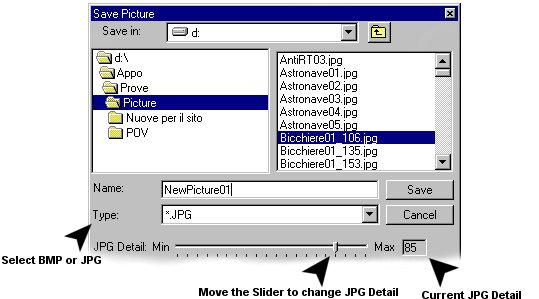
Note : To Save the Picture Control content in JPG, you need before to save it in BMP in a know directory (for example the same of the application), with an unique name (es. Temp.bmp) and for last delete it (Kill App.Path & "\temp.bmp").