
| CN3DPattern |
|
Members :
Name |
Description |
| Load | Open the N3DPattern interface. |
| Get_PatternFromString | Convert a Pattern string in a colors array. |
Pattern string format :
Position1-Color1; Position2-Color2;......; PositionN-ColorN;
es. 0-16723812;1000-39925;360-6553600;
The insert oredr is irrelevant. The important is set up the position from 0 to 1000.
Example of use :
To Open the N3DPattern interface and get the Pattern string :
Dim objPattern As New CN3DPattern
Dim strDummy As String ' Default String
strDummy =
"0-" & RGB(100, 47, 255) & ";" & "1000-" &
RGB(245, 155, 0) & ";" & "360-" & RGB(0, 0, 100) &
";"
objPattern.Load strDummy
Set objPattern = Nothing
N3DPattern Interface :
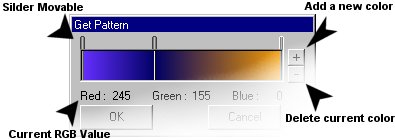
To Convert a string in a 1001 elements array (0 to 1000). Where each element rappresent the current color in Long format :
Dim objPattern As New CN3DPattern
Dim Pattern() As Long ' Resultant Array
Dim strDummy As String ' String to
convert
strDummy =
"0-" & RGB(100, 47, 255) & ";" & "1000-" &
RGB(245, 155, 0) & ";" & "360-" & RGB(0, 0, 100) &
";"
objPattern.Get_PatternFromString strDummy, 1000, Pattern
Set objPattern = Nothing
Erase Pattern
Remember : There must be a minimum of 2 Colors. If only one is valorized then this will be the first Color and the last will be Black. If no colors are valorized or the string syntax is wrong then both the extremities will be Black.